
How to Choose Exterior Home Renderings for Your Project

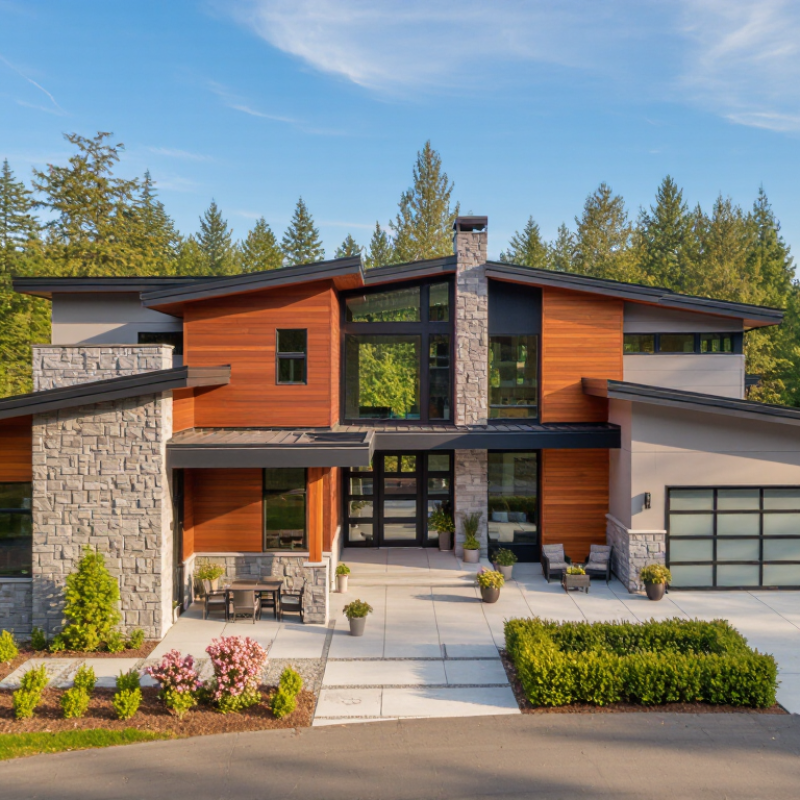
Choosing the right Exterior Home Renderings can shape how your entire project is understood. A convincing image does more than display an attractive façade. It shows scale, material texture, daylight, landscaping, and the relationship between the home and its surroundings. For homeowners, architects, and developers, this visual evidence can reveal design strengths before construction begins.

Begin with the project’s purpose. A planning presentation may require accurate proportions, neighboring buildings, and realistic site conditions. A marketing image may need warmer lighting, furnished interiors, and carefully staged planting. The difference matters. A glossy sunset scene cannot hide a poorly resolved roofline or impractical entrance. It may look impressive, but it can mislead decision-makers.

Look closely at the renderer’s experience with similar homes, climates, and materials. Ask to review completed work, not only polished sample images. Stone, timber, brick, and metal each reflect light differently. An experienced visualization professional should understand these details and communicate clearly with your architect or contractor. They should also confirm the number of revisions, image resolution, camera angles, and delivery schedule.

Small details create trust.

Still, no rendering is perfect. Colors may shift across screens, and landscaping may mature differently than shown. I have found that early assumptions often need correction after reviewing real material samples. Treat the images as informed design tools, not absolute promises. The strongest Exterior Home Renderings balance visual appeal with honest construction information, helping you make confident choices without losing sight of practical costs, local conditions, and the home’s lived experience.
How to Choose Exterior Home Renderings for Your Project

Define the Brief Through RIBA’s 8-Stage Plan of Work and Project Risks

How to Choose Exterior Home Renderings for Your Project

Define the Brief Through RIBA’s 8-Stage Plan of Work and Project Risks

A useful exterior rendering begins with a defined brief, not a dramatic camera angle. RIBA’s eight-stage plan moves from strategic definition through handover and use. At Stage 0, record the site, budget, planning limits, sustainability goals, and decision-makers. By Stage 2, the rendering should test massing, materials, entrances, window proportions, and garden levels. Avoid showing details that the design team has not approved.

Risk must shape the image.

The Health and Safety Executive recorded 51 fatal injuries among construction workers in Great Britain during 2023/24. A visual brief should therefore identify access routes, temporary works, delivery zones, boundary conditions, and difficult ground levels. These details help designers question buildability before visual polish hides problems. They also give consultants clearer evidence during design reviews.

At Stage 3, request several controlled views: street approach, rear garden, neighbour relationship, and dusk lighting. Specify the camera height and season. A low camera can exaggerate scale. Warm lighting can disguise poor shading.

I once accepted an attractive view that ignored a narrow delivery route. It looked convincing, but the proposal needed revision.

That mistake remains useful. A rendering is not proof of feasibility; it is a decision tool. Record assumptions beside each image, including unconfirmed planting, finishes, and surrounding buildings. Clear uncertainty is more professional than false precision.

Choose Visual Detail with BIMForum LOD 100–400 Definitions

How to Choose Exterior Home Renderings for Your Project

Exterior renderings should match the project’s BIMForum Level of Development, or LOD.

LOD 100 shows a concept, such as building mass, approximate height, and roof form. LOD 200 adds approximate sizes, locations, and quantities. Use it for early options, not final material decisions. LOD 300 presents accurate geometry, orientation, and placement. It can support clearer coordination between designers, owners, and contractors. LOD 400 includes fabrication and installation detail. That level may be excessive for a simple planning image.

The BIMForum LOD Specification 2024 stresses that LOD describes model reliability, not visual beauty. This distinction matters. A glossy image can still show uncertain information. The 2021 NBS National BIM Report found that 73% of construction professionals used BIM. That figure supports a practical shift toward coordinated digital information. Yet, I still see teams requesting LOD 400 visuals before the façade design is stable. It creates sharper images, but not necessarily better decisions. LOD is not a promise of perfect reality.

Tips: Choose LOD 100–200 for massing studies and planning discussions. Select LOD 300 when window positions, cladding joints, and roof edges need review. Reserve LOD 400 for construction-sensitive details, such as panel interfaces or fixing zones. Ask the visual team to label assumptions clearly. One missing note can mislead a whole meeting. Check the model against drawings before approval; renderings are persuasive, and sometimes wrong.

Match Materials and Colors Using ASTM E84 and Manufacturer Data

Choosing exterior home renderings starts with matching the visual design to tested material performance. ASTM E84 reports flame spread and smoke-developed characteristics under specific laboratory conditions. It does not measure color fading, cracking, water resistance, or long-term weathering. Use it as one safety reference, not the entire decision.

Request current manufacturer data for the exact render system, including primer, basecoat, mesh, and finish. Confirm that the tested assembly matches your wall construction. A pale mineral tone may reflect more sunlight, while a deep tone can absorb heat and show uneven fading. Check light-reflectance information, exposure limits, maintenance guidance, and regional climate suitability. Sample the finish outdoors. Morning light can look completely different from late afternoon light.

Tips:
Compare samples beside windows, roof materials, and paving. Record the product batch and color code. Ask for testing details, not just a general certificate. I once overlooked the substrate, and the color appeared correct until the full wall dried. That mistake was avoidable. Renderings can also hide texture changes, so inspect a larger sample at several angles. If ASTM E84 data seems unrelated to the proposed assembly, pause the selection and request clarification from a qualified building professional. Test results should be traceable, recent, and specific. Small assumptions create expensive revisions.

Test Sunlight and Exterior Lighting Against IES Recommended Practice

Choosing exterior renderings should begin with light, not surface color. A facade that looks balanced at noon may become harsh at 5 p.m. I test the proposed view through sun studies across key seasons. The model includes orientation, nearby walls, trees, balconies, and roof overhangs. Small omissions can change the result. A two-meter tree shadow may cross a doorway, while bright paving can reflect light into lower windows. I record the date, time, location, and sky condition for each image. This makes comparisons more reliable.

For exterior lighting, I compare the rendering with IES recommended practice for illuminance, uniformity, glare control, and visual comfort. These references help define what should be measured, rather than judged by appearance alone. Entrances, paths, stairs, and service areas need different lighting responses. I check whether a fixture creates a dark gap behind a column or a bright patch on wet pavement. Warm light can support a welcoming entrance, but excessive contrast may hide steps. Photometric data should guide the scene, yet the rendering must reflect real mounting heights and aiming angles. Otherwise, the image may look polished but mislead the project team.

I create three versions: clear afternoon, overcast evening, and late night. The night test is usually the most revealing. Windows may glow too strongly, and uplights may spill toward neighboring homes. The first pass is rarely perfect. That is useful. Revising the camera height, exposure, or shadow softness can expose assumptions that need checking. I keep source files and test notes with the project record. A reviewer can then trace each lighting decision.

How to Choose Exterior Home Renderings for Your Project

Test sunlight and exterior lighting against typical outdoor illuminance levels before approving a rendering. The values below are representative physical conditions used for early visual comparison; final exterior-lighting criteria should be verified against the applicable IES recommended practice and local code.

Direct summer sunlight can reach approximately 100,000 lux, while an overcast sky is commonly around 10,000 lux. Twilight and moonlight are substantially darker, typically about 10 lux and 0.3 lux respectively. Use the chart to check whether facade materials, glazing, landscape elements, and exterior fixtures remain visually legible across changing conditions.

Approve Files Under ISO 19650 Naming, Versioning, and Review Controls

How to Choose Exterior Home Renderings for Your Project

Approve Files Under ISO 19650 Naming, Versioning, and Review Controls

Selecting an exterior rendering is not only a design decision. It is also a document-control task. Choose views that clearly show materials, roof edges, window proportions, entrances, and the surrounding ground line. Each approved file should follow the project’s ISO 19650-aligned naming convention. Include the project, originator, volume, level, type, role, number, and status where required. A practical naming rule helps reviewers identify a file without opening it.

Version control prevents an attractive but outdated image from reaching construction discussions. Record revisions consistently, such as P01 for preliminary work and C01 for an authorized change. Keep review comments attached to the correct version. Approval should identify the reviewer, date, status, and any conditions. A clean file is not always a reliable file. I have seen teams approve polished images with missing material notes.

Tips: Create a short naming guide before production begins. Use one sample filename and explain every field. Check filenames, view references, and revision codes during each review. Keep it visible. Also confirm that the approved rendering matches the latest model and specification. Small mismatches can weaken confidence, especially when brick tones or window frames change late. If a naming field feels unnecessary, discuss it before removing it. Consistency matters more than personal preference.

How to Choose Exterior Home Renderings for Your Project - Approve Files Under ISO 19650 Naming, Versioning, and Review Controls

Decision Dimension Recommended Data or Option Typical Project Requirement ISO 19650-Aligned File Control Approval Evidence Priority
Primary Rendering Purpose Planning submission, design coordination, stakeholder review, marketing visualization, or construction reference Define one primary purpose for each rendering package to prevent conflicting expectations Record the purpose in the information container description and agree it in the project information requirements or delivery plan Approved purpose statement and review milestone High
Exterior View Selection Front elevation, rear elevation, primary street corner, garden side, entrance approach, and aerial context view Use 3 to 6 views for a typical detached or semi-detached home; add views where neighboring properties or site boundaries affect approval Assign a unique view identifier, such as EXT-01 or EXT-02, and keep it consistent across revisions View register showing camera position, direction, date, and approved viewpoint High
Image Resolution 3840 × 2160 pixels for high-quality review or presentation; 1920 × 1080 pixels for routine coordination Maintain a 16:9 aspect ratio when the image will be reviewed on standard digital displays State the resolution and intended use in the container metadata or transmittal record Resolution check and visual quality review at 100% display size Medium
File Format PNG for lossless review images; JPEG for compact presentation files; PDF for controlled review sheets containing comments or annotations Use one agreed format per purpose and avoid replacing a controlled review file with an untracked export Include the file format in the delivery requirements and keep the source model or scene file under the same revision control process Format validation and readable image or PDF inspection Controlled
Material and Colour Fidelity Show approved façade materials, roof finish, window frames, doors, paving, planting, and external lighting conditions Use material references that match the current design information; clearly label any placeholders or assumptions Link the rendering to the latest approved information container or drawing reference rather than relying on an untracked image alone Material schedule cross-check and design lead sign-off High
Lighting and Weather Scenario Neutral daylight for design review; additional morning, evening, or overcast views only when required by the brief Use consistent sun direction and weather assumptions across comparable views Record lighting scenario, geographic orientation, and rendering date in the review information Scenario note, consistent shadows, and confirmation that lighting does not conceal design issues Medium
Context Accuracy Include site boundaries, adjacent buildings, roads, trees, levels, fences, and relevant public viewpoints Model or represent context to the level needed for planning, privacy, daylight, and streetscape decisions Identify context sources and their information status; distinguish verified site data from illustrative assumptions Context checklist, survey reference, and reviewer comments resolved High
ISO 19650 Naming Structure PRJ-ARC-ZZ-XX-IM-000101-EXT-01-P01 Use project-agreed fields for project, originator, zone, level, type, role, number, view identifier, and revision Do not copy this example blindly: naming fields, separators, suitability codes, and revision rules must be defined in the project information standard Automated naming check or common data environment validation report High
Version and Revision Control Use sequential revision identifiers such as P01, P02 for preliminary iterations and C01, C02 for later contractual or authorized revisions when defined by the project Never overwrite an issued file; create a new revision and retain the superseded record Apply the project-approved revision convention and record who changed the file, when it changed, and why it changed Revision history, change description, and superseded-file record Controlled
Review Status and Suitability Use project-defined status codes for work in progress, shared coordination, authorized review, or published information Only release a rendering for a stated purpose; do not treat a coordination image as construction information without authorization Apply the agreed suitability or status code in the common data environment and include review comments in the transmittal Review workflow record, status change, and named approver High
Review Roles Originator, design lead, planning or client reviewer, and information manager where assigned Separate production from approval so that the person creating the rendering is not the only person validating it Use a responsibility matrix and review workflow with clear acceptance, comment, and rejection actions Named review participants and dated approval decision High
Comment Resolution Track comments by issue number, view identifier, responsible person, due date, response, and closure status Resolve design-critical comments before the rendering is marked suitable for its intended use Keep the comment log linked to the relevant information container and revision Closed comment register with evidence of changes High
Approval Gate Approve only after geometry, materials, context, camera position, image quality, naming, revision, and status have passed review Use a formal approval decision: accepted, accepted with comments, or rejected Move the file through the agreed common data environment workflow and preserve the audit trail Approval record, final review date, approver identity, and issued revision High
Archive and Retention Retain approved images, source files, review comments, transmittals, and superseded revisions according to the project retention period Keep enough information to understand what was approved, for which purpose, and at which design stage Use controlled archive permissions and maintain links between the final rendering and supporting information Archive index and retrieval test Controlled

Note: ISO 19650 projects normally define their own naming fields, status codes, suitability codes, revision rules, approval gates, and common data environment workflows. The examples above should therefore be adapted to the project information standard before use.

(08) 7200 3909